NI DIAdem培训班
班级规模及环境 |
|
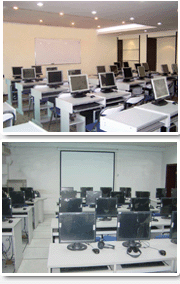
为了保证培训效果,增加互动环节,我们坚持小班授课,每期报名人数限3到5人,多余人员安排到下一期进行。人手一机,全程实践。 |
上课时间和地点 |
|
上课地点:【【上海】:同济大学(沪西)/新城金郡商务楼(11号线白银路站) 【深圳分部】:电影大厦(地铁一号线大剧院站)/深圳大学成教院
【北京分部】:铸诚大厦/人民大学 【南京分部】:金港大厦(和燕路) 【武汉分部】:佳源大厦(高新二路)
【成都分部】:领馆区1号(中和大道)
最近开课时间(周末班/连续班/晚班):DIAdem开课时间:2026年2月7日..参加培训,提升专业技能....课程再次升级....学用相长,注重实践.... 以质量赢得尊重....资深工程师亲授.. .. 直播、现场培训皆可 ..用心服务..........--即将开课--(即将开课,请咨询客服)....
本课程每期班限额5名,报满即停止报名,请提前在线或电话预约
|
费用和课时 |
◆课时:5天,总计30学时
◆团体报名优惠措施:两人95折优惠,三人或三人以上9折优惠 。注意:在读学生凭学生证,即使一个人也优惠500元。
◆外地学员:代理安排食宿(需提前预定)
☆注重质量
☆边讲边练 ☆合格学员免费推荐工作
★实验设备请点击这儿查看★
|
质量保障 |
|
1、培训过程中,如有部分内容理解不透或消化不好,可免费在下期培训班中重听;
2、培训结束后,培训老师留给学员手机和Email,免费提供半年的技术支持,充分保证培训后出效果;
3、培训合格学员可享受免费推荐就业机会。 ☆合格学员免费颁发相关工程师等资格证书,提升您的职业资质。专注高端培训13年,曙海提供的证书得到本行业的广泛认可,学员的能力得到大家的认同,受到用人单位的广泛赞誉。 |
学习进度 |
| 课程大纲 |
| 第一阶段 |
Introduction to Real-Time Test
This lesson introduces you to the fundamental concepts of real-time testing. You learn the terminology and roles
associated with real-time testing. You also learn about different types of closed-loop control testing, including model-inthe-loop and hardware-in-the-loop testing, and how they fit into the controller development process. Topics include:
? Real-Time Test
? Closed-Loop Control
? Model-in-the-Loop Testing
? Hardware-in-the-Loop Testing
? The V-Diagram
Introduction to NI VeriStand
This lesson introduces you to the NI VeriStand environment, its components, and the architecture of an NI VeriStand
system. Topics include:
? What is NI VeriStand?
? NI VeriStand Environment
? VeriStand Engine Architecture
Configuring Hardware
This lesson describes the various types of hardware that NI VeriStand can interact with as part of your real-time test
system. This lesson provides an overview of each type of hardware and describes how you can add each component
to your NI VeriStand system. Topics include:
? PXI
? CompactRIO
? MAX
? DAQ
? XNET
? FPGA
? Other Hardware
Importing and Mapping to Models
This lesson introduces you to the concept of software modeling and describes how you can import, configure, and use
models developed in a variety of environments within NI VeriStand. Topics include:
? What is a Model
? Supported Modeling Environments
? Importing a Model
? Model Execution
? System Mappings
|
| 第二阶段 |
Exploring Engine Features
This lesson introduces you to features of the VeriStand Engine that you can use to develop a more robust application.
You learn to create your own channels for storing data and performing calculations. You also learn how to trigger alarms
and procedures that react to various system conditions. You learn how to distribute your NI VeriStand system across
one or more hosts and targets. Topics include:
? User Channels
? Calculated Channels
? Alarms
? Procedures
? Distributed Systems
Configuring the Workspace
This lesson describes the ways in which you can monitor and modify your system from the Workspace window. You
learn about the types of controls and indicators that you can place on your workspace and how you can use screens to
organize them. You also learn about the different types of tools that you can launch from the workspace to monitor and
configure your system as well as how you can configure user permissions for your system. Topics include:
? Workspace Screens
? Workspace Tools
? Workspace Settings
|
第三阶段 |
Creating Stimulus Profiles
This lesson introduces the Stimulus Profile Editor and describes how you can use it to stimulate the unit under test and
log its responses. Topics include:
? Stimulus Profile Editor
? Creating a Real-Time Sequence
? Creating a Stimulus Profile
Benchmarking and Improving Performance
This lesson describes how you can measure the execution speed and CPU usage of your NI VeriStand system and
introduces techniques for improving each. Topics include:
? Benchmarking
? Improving Performance
Extending NI VeriStand
This lesson introduces the ways in which you can extend the functionality of NI VeriStand. You learn how to use NI
VeriStand functionality from other applications, how to use custom workspace tools and objects to extend the
workspace, and how to use custom devices to extend the VeriStand Engine. Topics include:
? Calling the NI VeriStand API
? Customizing the Workspace
? Customizing the VeriStand Engine |
| |
|
|